
A privacy feature that hides insights if there are too few responses for a segment. If you would loto give it a try, please send a message to support@caplena.com
If the limit is set to 5, any topic or filter combination based on 5 or fewer responses will be hidden, helping protect respondent anonymity.
Real example:
I set the case limit to 5. When I click the topic SPECIAL OFFERS, which has 2 responses, Caplena hides the view to protect respondent privacy and shows a case-limit notice instead of individual responses.
When you apply a global filter in the report, the behavior of your insights depends on whether the selected topics meet the minimum case number required for insights to be calculated.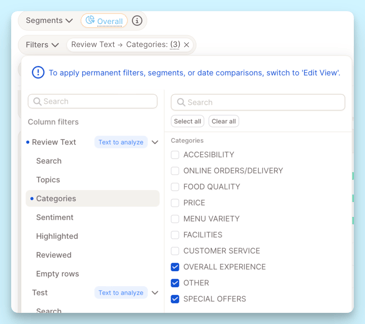
Case A: Only topics below the minimum case number selected
-
All insight elements will appear blank.
-
This is expected: insights cannot be calculated for topics with too few cases.
Case B: Mix of topics below and above the minimum case number
-
Insight elements will still be shown.
-
Topics with enough cases will display as usual.
-
Topics below the minimum case number will still appear in charts but you won´t be able to see individual responses.