
If you've ever imported a chat transcript and seen it display as one long block of text, you know how hard that is to work with. Caplena can do better than that, it can display each message as its own bubble, clearly labeled by speaker, just like a real conversation thread.
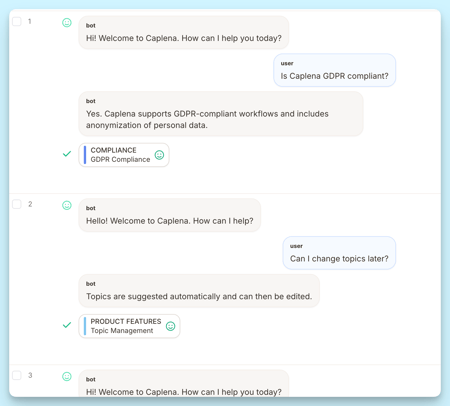
Getting there takes a small amount of setup. This article explains how it works, what formats are supported, and what to do when things don't look right.
The basic idea
Three things need to be in place for chat parsing to work:
- Speaker labels tell Caplena who said what. Every message must start with one.
- Column configuration tells Caplena which labels to look for. Without it, the column shows as plain text.
- Consistent formatting across rows ensures every message gets parsed correctly.
If all three are in place, Caplena renders the conversation as structured chat. If it can't reliably detect the structure, it falls back to showing the original text. Either way nothing gets lost, but the structured view is much easier to read and analyze.
What formats does Caplena support?
Speaker labels on their own
The most common format. Each message starts with a label, followed by the message text. All of these work:
<<USER>> Hello
<<BOT>> Hi!
Alice Miller: Hallo
Peter Smith: Salve
[Agent] Hello
>>Customer>> Hi there
Speaker labels with timestamps
Timestamps before the speaker label are completely fine. Caplena handles the most common date and time formats automatically:
[12:34] <<USER>> Hello
[12:35] <<BOT>> Hi!
03.12.2023, 18:01:56: Alice Miller: Hallo
[03.12.2023, 18:37:56] Peter Smith: Salve
03/12/2023, 6:01 PM - Alice Miller: Hallo
2023-12-03T18:01:56Z <<USER>> Hello
The golden rule: as long as every message starts with a recognizable label and that label is configured in Caplena, the transcript will parse correctly.
Try it with sample data
Not sure if your format will parse correctly? Download the sample file here, it covers every supported format with real transcript examples and tells you exactly which speaker labels to configure for each one.
Configuring speaker labels in Caplena
To enable chat parsing, you need to tell Caplena which speaker labels appear in your data. This is done in the column settings.
How to configure:
- Open your project and go to Project Settings.
- Enable the Chatbot conversation toggle. This unlocks the speaker configuration fields below it.
- Under Define who is speaking in your data, click + Add speaker.
- For each speaker, fill in two fields:
- Speaker name - a display label (e.g. User, Agent). This is just for display purposes.
- Speaker identifier - the exact prefix string as it appears in your data (e.g.
<<USER>>,Question:,Jon Doe:).
- Add one entry per speaker. You can have up to 10.
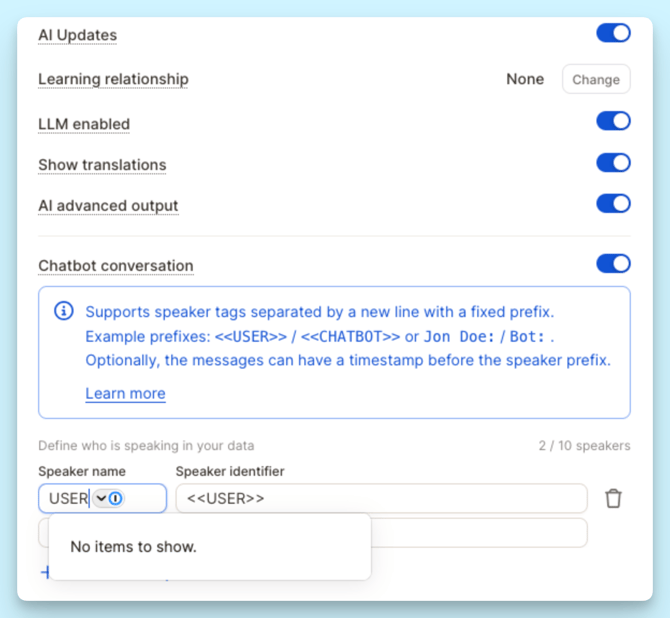
⚠️ Important: The Speaker identifier field looks like a dropdown, but it is a free-text input. Type the exact prefix from your data, including any brackets, colons, or formatting. If your data uses Question: and Answer:, type those exactly. Caplena matches character by character, so a missing colon or extra space will prevent parsing.
💡 Tip: Copy a real line from your data and paste just the prefix into the Speaker identifier field to avoid typos.
Troubleshooting
The conversation isn't showing as chat messages
Why this happens: The speaker labels either weren't configured or don't exactly match the data.
What to check: Take one real row from the dataset and compare it character by character with what's been configured. Pay close attention to spaces, brackets, colons, and capitalization. Then check a handful of other rows to confirm the same format is used throughout, if different rows use different styles, that alone can prevent parsing.
Messages are getting merged together
Why this happens: When a line doesn't start with a recognized speaker label, Caplena treats it as a continuation of the message above it.
What to check: Look for label variations in the data that haven't been configured yet, a third speaker, a bot with a slightly different label, or a line that got formatted differently. Make sure every label variation that actually appears in the data has been added to the column configuration.
The raw transcript keeps showing up
Why this happens: When the format is too inconsistent for Caplena to parse reliably, it falls back to the original text rather than risk splitting messages incorrectly.
What to check: Look for rows that use a different pattern from the rest, a different label style, a different timestamp format, or a mix of both. Identifying and fixing those outlier rows, or standardizing the format before import, will usually resolve it.
Translated messages are missing
Why this happens: Translations sometimes strip or reformat speaker labels, so the translated version of a transcript loses the structure that makes chat parsing possible.
What to check: Compare an original row and its translated counterpart side by side. If the labels aren't present in the translated version, or they've been reformatted, the structured chat view won't be available for that content.