> ## Documentation Index
> Fetch the complete documentation index at: https://docs.caplena.com/llms.txt
> Use this file to discover all available pages before exploring further.
# Anonymization
> Protect personal data and safely analyze or share sensitive feedback.
Enable anonymization to automatically remove **personally identifiable information (PII)** from your text before analysis, keeping you compliant with GDPR and other privacy regulations.
Anonymization **cannot be undone**. Only the anonymized version is stored in Caplena. The original data is automatically and permanently deleted from Caplena's servers within 7 days of upload.
***
### Enabling Anonymization
Anonymization is configured when creating a new project:
1. Click **New Project** and proceed through the upload flow
2. At the **Anonymization** step, toggle it on
3. Select which PII types to anonymize (see below)
4. Click **Continue** to proceed with your import
Anonymization is a plan-gated feature. If your subscription doesn't include anonymization, creating a project with it enabled is blocked. Contact support to upgrade your plan.
***
### Editing Anonymization Settings After Setup
You can update a project's anonymization settings at any time from **Project Settings → Anonymization**.
Open your project and click the **gear icon** (⚙️) in the left-hand menu
Switch to the **Anonymization** tab
Adjust the enabled PII classes, advanced settings, allow-list, or block-list. Changes are saved automatically.
Changes apply to **future imports only**. Data already imported into the project is not re-processed, and previously anonymized text cannot be restored — anonymization on existing data cannot be undone.
Editing anonymization requires the **Edit** project permission and a subscription plan that includes anonymization.
**What you can change:** the enabled PII classes (including advanced classes), the allow-list, and the block-list.
***
### Choosing What to Anonymize
Once enabled, a settings panel lets you select the PII types to mask:
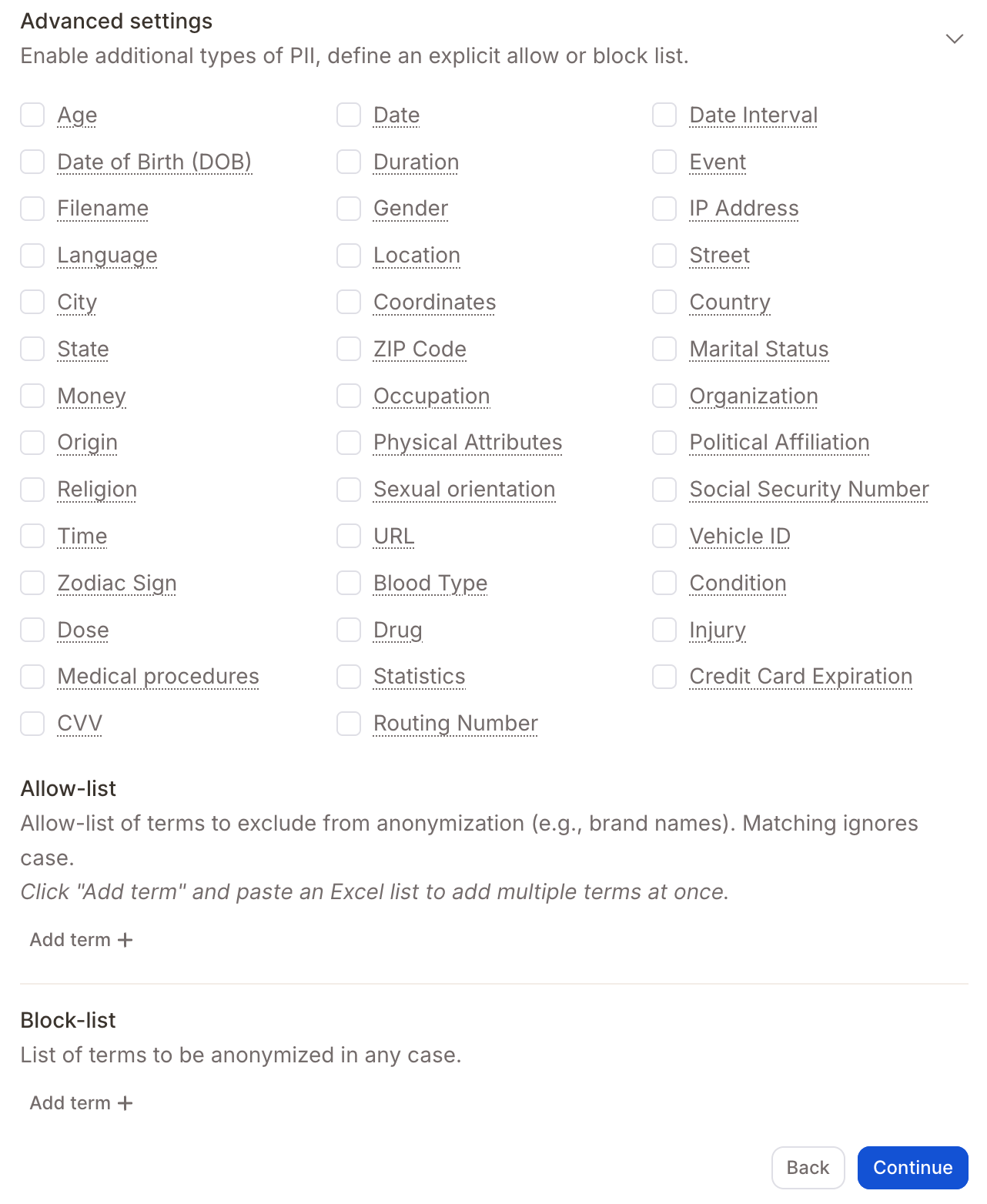
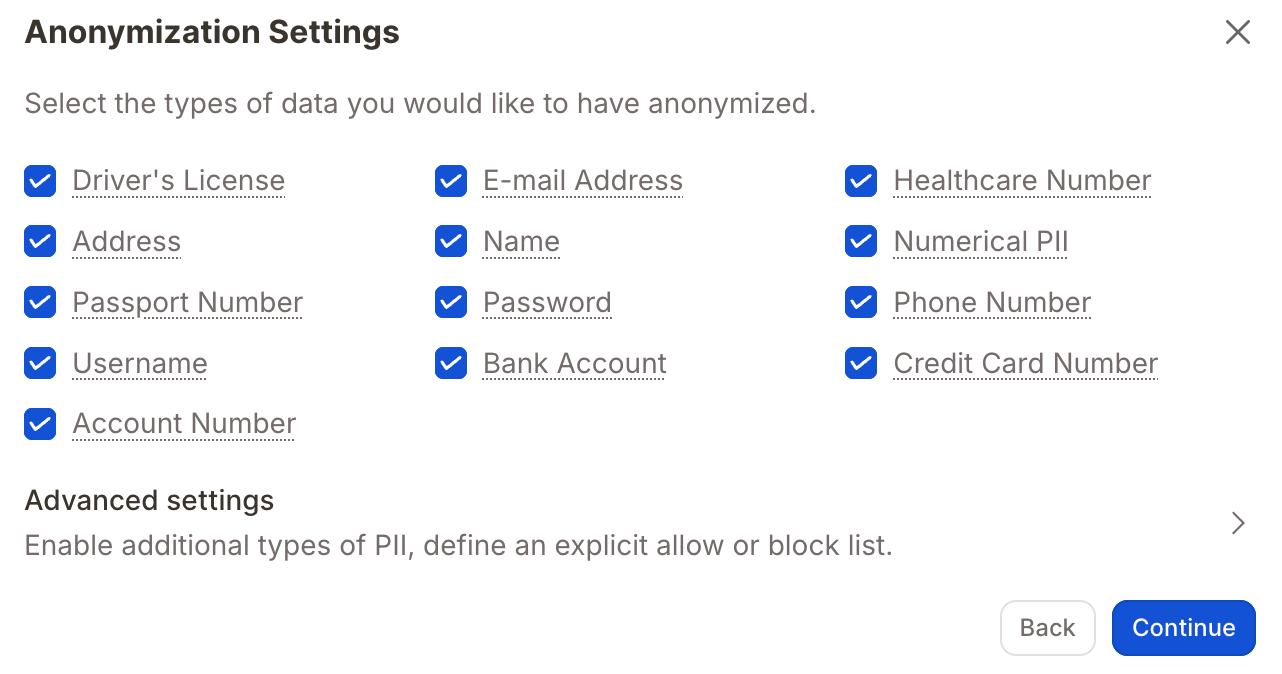 For more granular control, click **Advanced Settings** to include additional PII types (ZIP code, religion, gender, and more), add custom sensitive data fields, or tailor anonymization to industry-specific compliance requirements.
 ***
### Allow-list & Block-list
Fine-tune anonymization behavior with two optional lists:
**Allow-list** — Terms that should *never* be anonymized, even if they look like names (e.g. `Smith`, `John Doe`).
**Block-list** — Terms that should *always* be anonymized, even if they aren't names (e.g. `is`, `very curious`).
To add terms, click **"Add term"** or paste a list directly from Excel. Matching is **case-insensitive** and **whole-word only** — partial matches are ignored.
| Input | Output | Notes |
| --------------------- | ------------------------------- | ---------------------------------------- |
| Hello Mr **Smith** | Hello Mr **Smith** | Exact match; preserved due to allow-list |
| Hello Mr **smith** | Hello Mr **smith** | Case-insensitive match; preserved |
| Hello Mr **Smithson** | Hello Mr **\[NAME\_FAMILY\_1]** | Not an exact match; anonymized |
| I am **John Doe** | I am **John Doe** | Exact match; preserved |
| **Doe** | **\[NAME\_1]** | Not a full match; anonymized |
**Block-list example** — `is` and `very curious` configured as blocked terms:
| Input | Output | Notes |
| ---------------------------- | -------------------------------------- | ------------------------------------- |
| This **is** the Smith family | This **\[CUSTOM\_1]** the Smith family | "is" is in the block-list; anonymized |
| I am **very curious** | I am **\[CUSTOM\_1]** | Exact phrase match; anonymized |
| Just **curious** | Just **curious** | Not a full match; not anonymized |
***
### Address vs. Location
Caplena distinguishes between two related but different PII types:
| Type | What it captures | Example |
| ------------ | ------------------------------------------------------- | ------------------------------------- |
| **Address** | Structured location formats — street, number, ZIP, city | `25 Oxford Street, London W1D 2LF` |
| **Location** | General geographic mentions or landmarks | `Central Park`, `Northern California` |
> "I visited **Lake Victoria**." → with *Location* enabled → "I visited **\[location]**."
>
> "I live at **12 Abbey Road, 23783 London**." → with *Address* enabled → "I live at **\[address]**."
How Address, Street, City, and ZIP interact:
| Option | Example (Original Text) | Output |
| ----------------- | ------------------------------------------------------------------------------------------------------- | ---------------------------------------------------------------------------------- |
| Address only | "Anna Smith, 742 Evergreen Terrace, Springfield, IL 62704, [anna@example.com](mailto:anna@example.com)" | "Anna Smith, \[LOCATION\_ADDRESS\_1], [anna@example.com](mailto:anna@example.com)" |
| ZIP/Postcode only | "742 Evergreen Terrace, IL 62704" | "742 Evergreen Terrace, \[postal code]" |
| City only | "I moved to London last year." | "I moved to \[city] last year." |
| Street only | "She lives at Oxford Street." | "She lives at \[street]." |
If you anonymize too much or something goes wrong, you'll need to re-upload the data in a new project. Reach out to support — we're happy to help and will reimburse credits if needed.
***
### Anonymization & Translation
Anonymization runs **before translation**. Anonymized source text will also produce anonymized translations — the two features work seamlessly together.
Not all languages are currently supported for anonymization. Texts in unsupported languages may be only partially anonymized.
**Supported languages:**
| Language | ISO Code |
| ----------------------- | -------- |
| Afrikaans | af |
| Arabic | ar |
| Bambara | bm |
| Belarusian | be |
| Bengali | bn |
| Bulgarian | bg |
| Burmese | my |
| Cantonese (Traditional) | zh-TW |
| Catalan | ca |
| Croatian | hr |
| Czech | cs |
| Danish | da |
| Dutch | nl |
| English | en |
| Estonian | et |
| Finnish | fi |
| French | fr |
| Georgian | ka |
| German | de |
| Greek | el |
| Hebrew | he |
| Hindi | hi |
| Hungarian | hu |
| Icelandic | is |
| Indonesian | id |
| Italian | it |
| Japanese | ja |
| Khmer | km |
| Korean | ko |
| Latvian | lv |
| Lithuanian | lt |
| Luxembourgish | lb |
| Malay | ms |
| Mandarin (Simplified) | zh-CN |
| Moldovan | ro |
| Norwegian (Bokmål) | nb |
| Persian (Farsi) | fa |
| Polish | pl |
| Portuguese | pt |
| Punjabi | pa |
| Romanian | ro |
| Russian | ru |
| Slovak | sk |
| Slovenian | sl |
| Spanish | es |
| Swahili | sw |
| Swedish | sv |
| Tagalog | tl |
| Tamil | ta |
| Thai | th |
| Turkish | tr |
| Ukrainian | uk |
| Vietnamese | vi |
***
### Allow-list & Block-list
Fine-tune anonymization behavior with two optional lists:
**Allow-list** — Terms that should *never* be anonymized, even if they look like names (e.g. `Smith`, `John Doe`).
**Block-list** — Terms that should *always* be anonymized, even if they aren't names (e.g. `is`, `very curious`).
To add terms, click **"Add term"** or paste a list directly from Excel. Matching is **case-insensitive** and **whole-word only** — partial matches are ignored.
| Input | Output | Notes |
| --------------------- | ------------------------------- | ---------------------------------------- |
| Hello Mr **Smith** | Hello Mr **Smith** | Exact match; preserved due to allow-list |
| Hello Mr **smith** | Hello Mr **smith** | Case-insensitive match; preserved |
| Hello Mr **Smithson** | Hello Mr **\[NAME\_FAMILY\_1]** | Not an exact match; anonymized |
| I am **John Doe** | I am **John Doe** | Exact match; preserved |
| **Doe** | **\[NAME\_1]** | Not a full match; anonymized |
**Block-list example** — `is` and `very curious` configured as blocked terms:
| Input | Output | Notes |
| ---------------------------- | -------------------------------------- | ------------------------------------- |
| This **is** the Smith family | This **\[CUSTOM\_1]** the Smith family | "is" is in the block-list; anonymized |
| I am **very curious** | I am **\[CUSTOM\_1]** | Exact phrase match; anonymized |
| Just **curious** | Just **curious** | Not a full match; not anonymized |
***
### Address vs. Location
Caplena distinguishes between two related but different PII types:
| Type | What it captures | Example |
| ------------ | ------------------------------------------------------- | ------------------------------------- |
| **Address** | Structured location formats — street, number, ZIP, city | `25 Oxford Street, London W1D 2LF` |
| **Location** | General geographic mentions or landmarks | `Central Park`, `Northern California` |
> "I visited **Lake Victoria**." → with *Location* enabled → "I visited **\[location]**."
>
> "I live at **12 Abbey Road, 23783 London**." → with *Address* enabled → "I live at **\[address]**."
How Address, Street, City, and ZIP interact:
| Option | Example (Original Text) | Output |
| ----------------- | ------------------------------------------------------------------------------------------------------- | ---------------------------------------------------------------------------------- |
| Address only | "Anna Smith, 742 Evergreen Terrace, Springfield, IL 62704, [anna@example.com](mailto:anna@example.com)" | "Anna Smith, \[LOCATION\_ADDRESS\_1], [anna@example.com](mailto:anna@example.com)" |
| ZIP/Postcode only | "742 Evergreen Terrace, IL 62704" | "742 Evergreen Terrace, \[postal code]" |
| City only | "I moved to London last year." | "I moved to \[city] last year." |
| Street only | "She lives at Oxford Street." | "She lives at \[street]." |
If you anonymize too much or something goes wrong, you'll need to re-upload the data in a new project. Reach out to support — we're happy to help and will reimburse credits if needed.
***
### Anonymization & Translation
Anonymization runs **before translation**. Anonymized source text will also produce anonymized translations — the two features work seamlessly together.
Not all languages are currently supported for anonymization. Texts in unsupported languages may be only partially anonymized.
**Supported languages:**
| Language | ISO Code |
| ----------------------- | -------- |
| Afrikaans | af |
| Arabic | ar |
| Bambara | bm |
| Belarusian | be |
| Bengali | bn |
| Bulgarian | bg |
| Burmese | my |
| Cantonese (Traditional) | zh-TW |
| Catalan | ca |
| Croatian | hr |
| Czech | cs |
| Danish | da |
| Dutch | nl |
| English | en |
| Estonian | et |
| Finnish | fi |
| French | fr |
| Georgian | ka |
| German | de |
| Greek | el |
| Hebrew | he |
| Hindi | hi |
| Hungarian | hu |
| Icelandic | is |
| Indonesian | id |
| Italian | it |
| Japanese | ja |
| Khmer | km |
| Korean | ko |
| Latvian | lv |
| Lithuanian | lt |
| Luxembourgish | lb |
| Malay | ms |
| Mandarin (Simplified) | zh-CN |
| Moldovan | ro |
| Norwegian (Bokmål) | nb |
| Persian (Farsi) | fa |
| Polish | pl |
| Portuguese | pt |
| Punjabi | pa |
| Romanian | ro |
| Russian | ru |
| Slovak | sk |
| Slovenian | sl |
| Spanish | es |
| Swahili | sw |
| Swedish | sv |
| Tagalog | tl |
| Tamil | ta |
| Thai | th |
| Turkish | tr |
| Ukrainian | uk |
| Vietnamese | vi |