> ## Documentation Index
> Fetch the complete documentation index at: https://docs.caplena.com/llms.txt
> Use this file to discover all available pages before exploring further.
# Languages and Translations
> Enable automatic translation and work with multilingual data across your project.
Caplena supports automatic translation through **DeepL** and **Google Translate**, letting you analyze multilingual datasets in a single unified language. Enable it in project settings with one toggle.
All text-to-analyze columns will be translated into the **Main Language** selected during project setup.
Set your Main Language to the same language you'll use for your topic collection. This ensures topics and translations stay aligned.
Translation fees are included in your subscription and Ad-Hoc credits — no additional charges apply.
***
### When to Enable Translation
Turn on automatic translation if any of the following apply:
* Your dataset contains **multiple languages** (e.g. English, German, and Chinese in the same file)
* Your text is in a language **not natively supported** by Caplena
* Your topic collection needs to be in a **different language** than the source text
* You don't speak the language your responses are written in
***
### DeepL vs. Google Translate
DeepL generally produces higher quality translations but supports a smaller set of languages. When DeepL is selected, Caplena uses it where supported and automatically falls back to Google Translate for everything else.
| Language | Google Translate | DeepL |
| ------------------------------------------------------------------------ | :--------------: | :---: |
| Afrikaans | ✓ | |
| Albanian | ✓ | |
| Arabic | ✓ | |
| Bulgarian | ✓ | ✓ |
| Chinese (Simplified) | ✓ | ✓ |
| Chinese (Traditional) | ✓ | |
| Czech | ✓ | ✓ |
| Danish | ✓ | ✓ |
| Dutch | ✓ | ✓ |
| English | ✓ | ✓ |
| Estonian | ✓ | ✓ |
| Finnish | ✓ | ✓ |
| French | ✓ | ✓ |
| German | ✓ | ✓ |
| Greek | ✓ | ✓ |
| Hungarian | ✓ | ✓ |
| Indonesian | ✓ | ✓ |
| Italian | ✓ | ✓ |
| Japanese | ✓ | ✓ |
| Latvian | ✓ | ✓ |
| Lithuanian | ✓ | ✓ |
| Malay | ✓ | |
| Polish | ✓ | ✓ |
| Portuguese | ✓ | ✓ |
| Punjabi | ✓ | |
| Romanian | ✓ | ✓ |
| Russian | ✓ | ✓ |
| Slovak | ✓ | ✓ |
| Slovenian | ✓ | ✓ |
| Spanish | ✓ | ✓ |
| Swedish | ✓ | ✓ |
| Thai | ✓ | |
| Turkish | ✓ | ✓ |
| Vietnamese | ✓ | |
| [All other languages](https://cloud.google.com/translate/docs/languages) | ✓ | |
***
### Language Detection
By default, Caplena auto-detects the source language of each entry. This works well for most text, though single-word entries may occasionally be misidentified.
**Specifying source language manually**
If you know the source language, add a dedicated column to your file using [ISO 639-1 language codes](https://en.wikipedia.org/wiki/List_of_ISO_639_language_codes) (e.g. `en`, `de`, `ja`). During upload, set that column type to **Source language**.
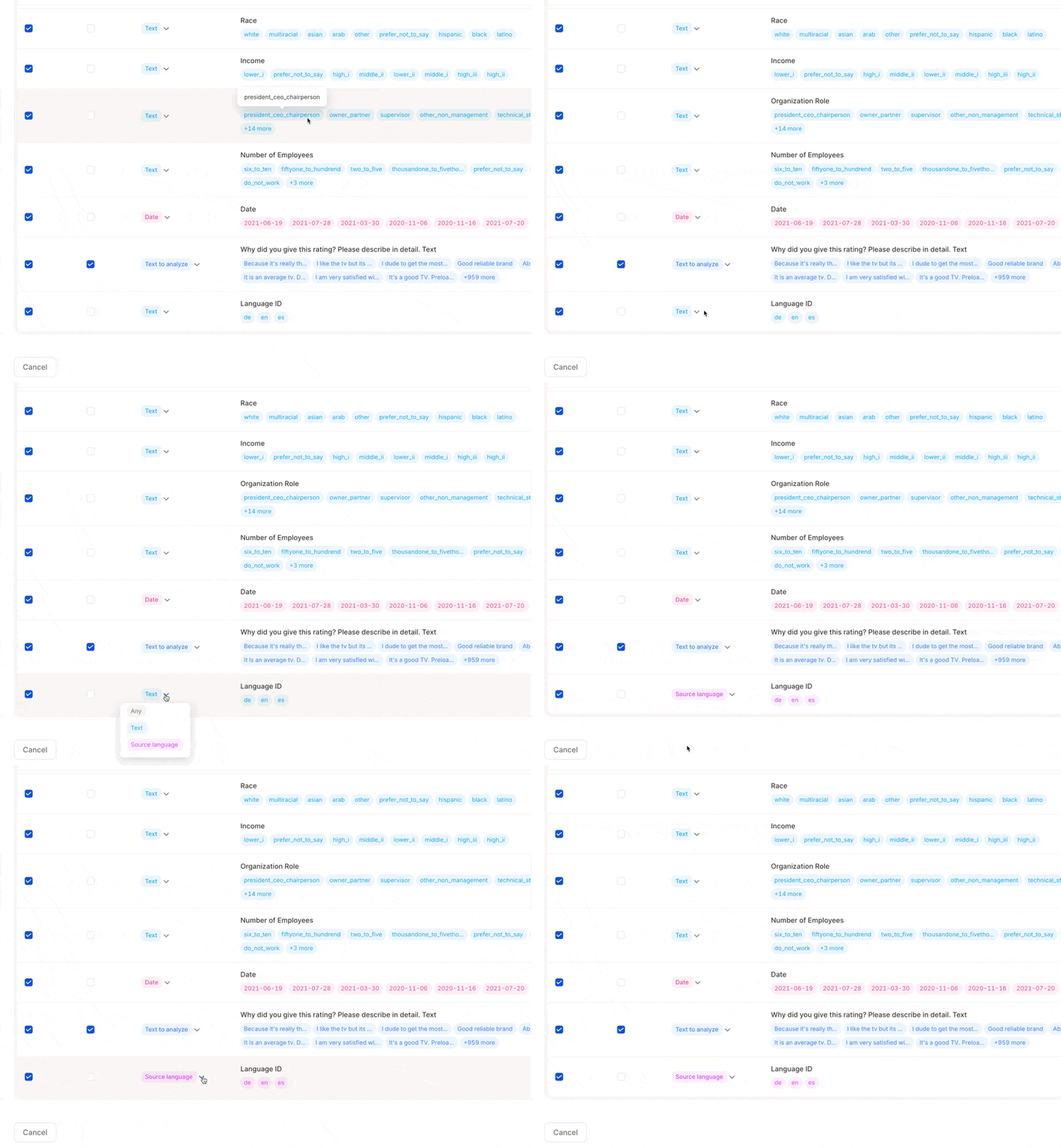 A few things to watch out for:
* Caplena may auto-detect the column as a Text column — adjust it manually before confirming the upload if needed
* For multilingual countries (e.g. Switzerland, Belgium), **leave the cell blank** if unsure — Caplena falls back to auto-detection for that row
* Language codes must be **lowercase ISO 639-1** — common mistakes: Japanese is `ja` not `jp`, Austrian German is `de` not `at`
***
### Viewing Translations in the App
Translations are accessible throughout Caplena — you're never locked into one view.
**Fine-tuning view**
A few things to watch out for:
* Caplena may auto-detect the column as a Text column — adjust it manually before confirming the upload if needed
* For multilingual countries (e.g. Switzerland, Belgium), **leave the cell blank** if unsure — Caplena falls back to auto-detection for that row
* Language codes must be **lowercase ISO 639-1** — common mistakes: Japanese is `ja` not `jp`, Austrian German is `de` not `at`
***
### Viewing Translations in the App
Translations are accessible throughout Caplena — you're never locked into one view.
**Fine-tuning view**
.gif?s=2a35fd08077f0b87cc9986f2acc93f2a) Each comment shows both the translated and original text. Use the **"See original / See translated"** toggle in the bottom-right corner of each comment. The translated version is shown by default.
**Visualizations**
Each comment shows both the translated and original text. Use the **"See original / See translated"** toggle in the bottom-right corner of each comment. The translated version is shown by default.
**Visualizations**
.gif?s=f9fc6a0b1a9618e39f71a4a51f0c8321) Charts are interactive — click any element to open the verbatim browser showing all comments behind that topic. Switch between original and translated versions directly within the browser.
**Data export**
Charts are interactive — click any element to open the verbatim browser showing all comments behind that topic. Switch between original and translated versions directly within the browser.
**Data export**
.gif?s=2007626e4fe392f9e6d21b93ec45e130) Translations are included by default in all data exports. Under **Advanced Export Options** you can reposition the translation column or exclude it entirely.
Translations are included by default in all data exports. Under **Advanced Export Options** you can reposition the translation column or exclude it entirely.