> ## Documentation Index
> Fetch the complete documentation index at: https://docs.caplena.com/llms.txt
> Use this file to discover all available pages before exploring further.
# How Integrations Work
> How data sources, integration items, syncing, and credits work
Another way to import data into Caplena is by using **direct integrations** with external platforms such as Google Maps, Trustpilot, Tripadvisor, Qualtrics, and more.
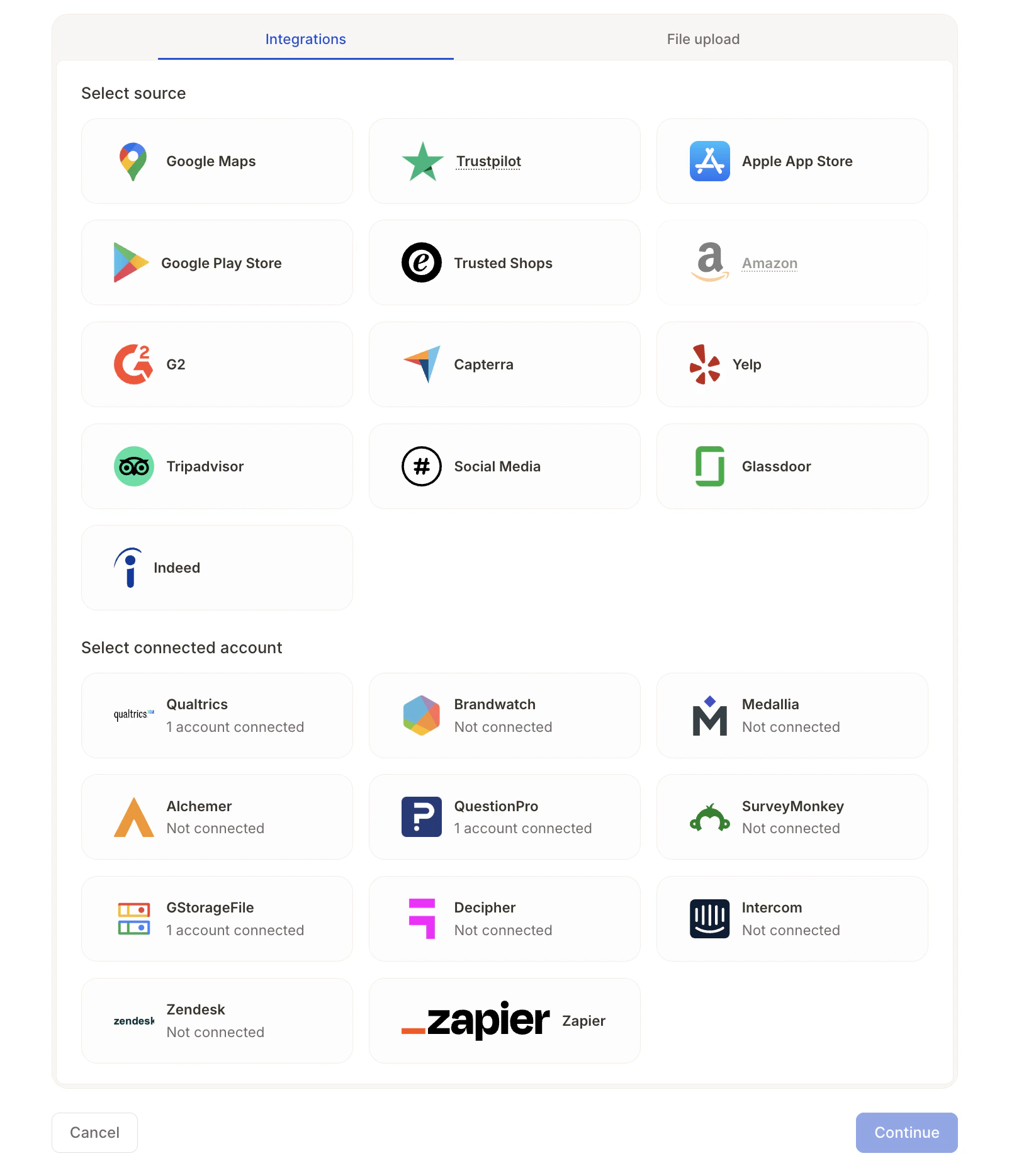 To make integrations easier to understand and manage, it helps to distinguish between **review platforms** and **survey & CX platforms**, as well as how data is structured and synchronized.
## How integrations work in Caplena
Each integration in Caplena consists of one or more **integration items**. You can think of integration items as the **specific resources you want to analyze**, such as:
* Reviews for a specific location on Google Maps
* Reviews for an app in Trustpilot
* Survey responses from a connected survey project
**Example:**
To make integrations easier to understand and manage, it helps to distinguish between **review platforms** and **survey & CX platforms**, as well as how data is structured and synchronized.
## How integrations work in Caplena
Each integration in Caplena consists of one or more **integration items**. You can think of integration items as the **specific resources you want to analyze**, such as:
* Reviews for a specific location on Google Maps
* Reviews for an app in Trustpilot
* Survey responses from a connected survey project
**Example:**
 If you want to compare three retail locations:
1. You create a **Google Maps integration**
2. Within that integration, you add 3 integration items as shown above
3. Caplena combines the data from these integration items into a **single project**, allowing you to analyze them together
One integration can contain **many integration items**.
## Syncing data automatically
A key benefit of using integrations is **automatic synchronization**. Caplena supports two types of sync cycles depending on the integration used:
**Review Platforms (public review sources)** → Synced every 3 days
This applies to platforms where Caplena collects publicly available ratings and written reviews (e.g. Google Places, Trustpilot, App Store, etc.). If a sync runs today, the next one happens in three days, at which point all reviews posted within that period are imported in one batch.
**Survey & CX Platforms (authenticated data connections)** → Synced daily
Includes sources where you connect your account directly via login/API (e.g. Qualtrics, Medallia, SurveyMonkey). These sync once per day at 2 am UTC and pull in new responses continuously.
You can turn synchronization off anytime from the **Data Sources** page by toggling it off in the integration item settings. If you have a lot of items, you can also do this in bulk.
If you want to compare three retail locations:
1. You create a **Google Maps integration**
2. Within that integration, you add 3 integration items as shown above
3. Caplena combines the data from these integration items into a **single project**, allowing you to analyze them together
One integration can contain **many integration items**.
## Syncing data automatically
A key benefit of using integrations is **automatic synchronization**. Caplena supports two types of sync cycles depending on the integration used:
**Review Platforms (public review sources)** → Synced every 3 days
This applies to platforms where Caplena collects publicly available ratings and written reviews (e.g. Google Places, Trustpilot, App Store, etc.). If a sync runs today, the next one happens in three days, at which point all reviews posted within that period are imported in one batch.
**Survey & CX Platforms (authenticated data connections)** → Synced daily
Includes sources where you connect your account directly via login/API (e.g. Qualtrics, Medallia, SurveyMonkey). These sync once per day at 2 am UTC and pull in new responses continuously.
You can turn synchronization off anytime from the **Data Sources** page by toggling it off in the integration item settings. If you have a lot of items, you can also do this in bulk.
 ## Billing & credits
* Integrations themselves do **not** incur extra fees
* Imported texts cost **1 credit per text**, just like any other upload
* Credits are only deducted **when the project is saved**
* With synchronization enabled, credits are deducted automatically as new data is imported
* Caplena provides an **estimate of the number of reviews** per integration item before the initial upload
**Example:** 3 Google Maps locations with \~1,000 reviews each → **3,000 credits** (initial import). If daily sync adds 10 new reviews per location → **30 credits per day**.
## What to read next
Learn which public review sources are supported and what data is imported.
Connect Qualtrics, Medallia, SurveyMonkey, and more for automatic daily sync.
## Billing & credits
* Integrations themselves do **not** incur extra fees
* Imported texts cost **1 credit per text**, just like any other upload
* Credits are only deducted **when the project is saved**
* With synchronization enabled, credits are deducted automatically as new data is imported
* Caplena provides an **estimate of the number of reviews** per integration item before the initial upload
**Example:** 3 Google Maps locations with \~1,000 reviews each → **3,000 credits** (initial import). If daily sync adds 10 new reviews per location → **30 credits per day**.
## What to read next
Learn which public review sources are supported and what data is imported.
Connect Qualtrics, Medallia, SurveyMonkey, and more for automatic daily sync.