
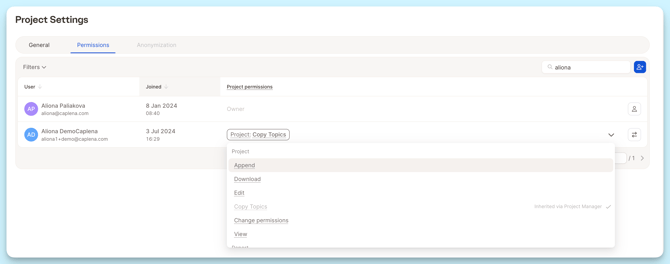
Sometimes you don’t want a user to see everything. You just want them to work on one project, view one report, or be able to upload new responses without touching anything else. That’s exactly what object-level permissions are for. They let you grant access per project or per report, without changing anyone’s role.
Why Object Permissions Exist
Real scenarios where they help:
-
You hire a freelancer to code one survey → you don’t want them inside the whole workspace.
-
A colleague is responsible for uploading new files → but shouldn’t edit your topics.
-
Your manager needs visibility on one project → not on all projects.
Roles alone can’t handle these use cases. Object-level permissions fill that gap.
Project Permissions
(What users can do inside one specific project)
| Permission | Description |
|---|---|
Projects View |
View project details and data |
Projects Edit |
Modify project settings, TTA columns, and answers |
Projects Create |
Create new projects |
Projects Download |
Download project data (answers, codes) |
Projects Append |
Add new rows/data to existing projects |
Projects Inherit |
Use project codebooks as templates for new projects |
Projects Permissions |
Manage who has access to projects |
Report Permissions
| Permission | Description |
|---|---|
Reports View |
View reports |
Reports Edit |
Modify report settings and content |
Reports Create |
Create new reports |
Integration Permissions
| Permission | Description |
|---|---|
Integrations Use |
Use existing integrations (import data from connected sources) |
Integrations Manage |
Create, modify, and delete integrations |
Administrative Permissions
| Permission | Description |
|---|---|
Team Management |
Manage team members (invite, remove, change roles) |
Subscription Management |
Manage billing and subscription settings |
Credit Usage |
Perform operations that consume credits (e.g., uploading data, AI coding / LLM smart columns once free use limit is reached) |
Permission Inheritance
Caplena’s sharing logic follows a simple hierarchy:
Project Access → Report Access
If a user can access a project, they automatically gain:
-
access to all reports in that project
-
access to all views in those reports
-
access to exports related to the project
Report Access → Report Views
If a user can view a report, they automatically see all its Views.
But:
-
Report access does not grant project access
-
Report access does not expose raw data
-
Report users cannot inspect answers unless granted project permissions
This lets you safely share Reports without exposing sensitive data.
Ownership & Root User (non-negotiable rules)
Object Owner
The person who created the project/report:
-
Always has full control
-
Cannot have permissions removed (only ownership transferred)
Root Organization User
The “master” account of your company:
-
Always sees everything
-
Cannot be restricted or removed