
What is Semi-Open Mode?
Semi-open mode is designed for structured open-text questions where responses follow a limited and repeatable pattern.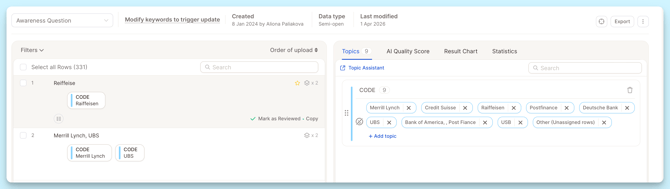
Typical use cases:
- Brand awareness (“Which brands do you know?”)
- List-based answers (products, competitors, sources)
- Short, repetitive responses (often 1–3 words)
Instead of exploring themes, Semi-Open focuses on:
- standardizing similar answers
- grouping variations of the same term
- creating clean, consistent categories
Important: Selecting Text Columns
Before starting the analysis, define your columns based on your use case:
Option 1: Analyze columns separately
- Select each column as Text-to-Analyze (TTA)
- Use this if you want to compare results across questions
Each TTA column is analyzed separately and consumes credits
Option 2: Combine columns
- If your data is split across multiple columns, you can combine them using Smart Columns after import.
Use this if:
- the columns contain the same or very similar question
- you want one unified analysis
👉 See the dedicated Smart Columns guide for detailed steps.
Starting Analysis
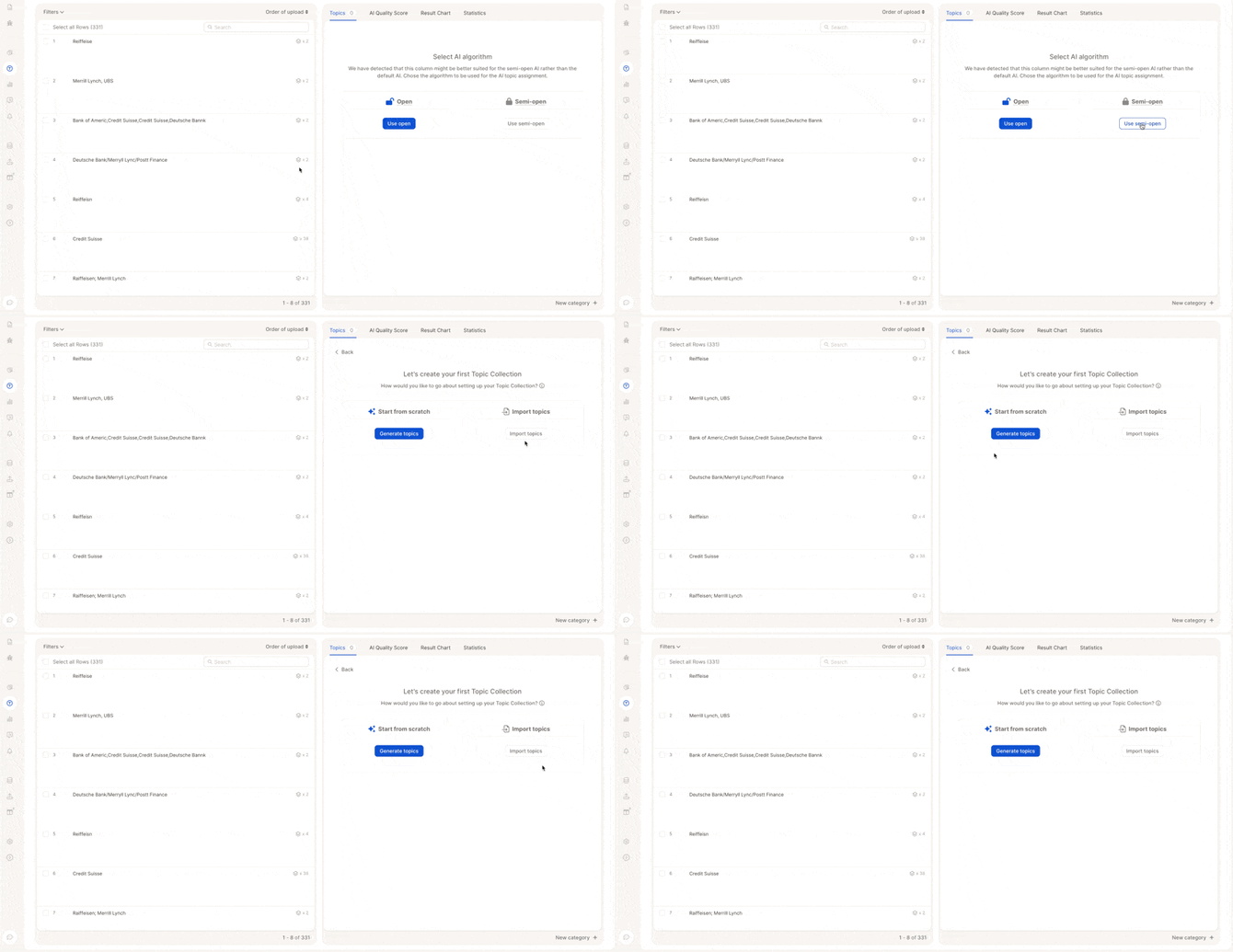
You can choose:
Start from scratch
- AI generates initial topics and categories
Reuse existing structure
- Import a topic collection
- Reuse categories from another project
Key Settings
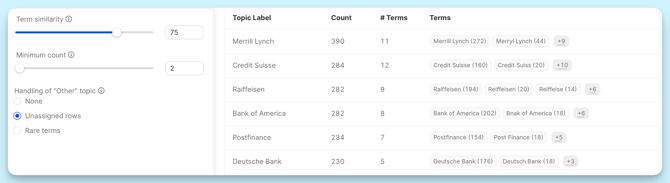
Term Similarity
Controls how strictly terms are grouped
- 100% → exact matches only
- ~75% → groups similar variations (e.g. spelling differences)
Minimum Count
Defines how often a term must appear to become a topic
- Example: 2 → only terms mentioned ≥2 times are separate topics
“Other” Topic Options
Controls how low-frequency responses are handled:
- None → no “Other” topic
- Unassigned Rows → only responses without a topic
- Rare Terms → low-frequency terms grouped into “Other”
Final Step: Review Topics & Keywords
Before finalizing your analysis, it’s important to review and fine-tune your topics and keywords. This ensures your results are accurate and aligned with your goals.
Review Topics
Start by checking the generated topics:
- Make sure each topic clearly represents a distinct answer or concept
- Rename topics if needed to improve clarity
- Merge similar topics to avoid duplication
- Remove any irrelevant or incorrect topics
Adjust Keywords
Each topic is supported by keywords that help the AI assign responses correctly.
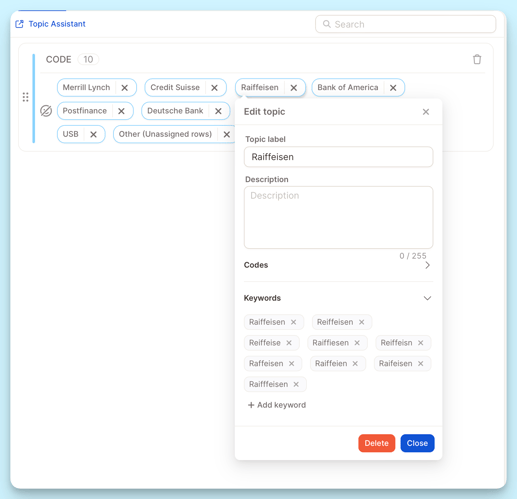
To edit keywords:
- Click on a topic
- Open the keyword list
- Add or adjust terms as needed
Keywords help ensure that all relevant responses are grouped correctly, especially when answers vary slightly.
Best practices:
- Include abbreviations
→ e.g. “FB” for Facebook - Add spelling variations
→ e.g. “McDonalds”, “Mc Donald’s” - Include common phrasing
→ different ways users might refer to the same concept - Be specific when needed
→ especially for similar or overlapping topics
How keyword matching works
The system tries to match the most specific keyword in the text.
If two keywords overlap, the system will:
pick the longer, more specific one
and ignore the shorter one
Example:
Keywords:
- Tesla
- Tesla Model 3
Text:
“I like my Tesla Model 3”
The system will match:
- Tesla Model 3 ✅
It will NOT match:
- Tesla ❌
Because the longer keyword already covers that part of the text.
Good to know
- Punctuation doesn’t matter (commas, dots, etc.)
- “Iqos, TEREA, Plum” works the same as “Iqos TEREA Plum”
- Only
||is treated as a separator
Important: Focus on Structure, Not Individual Rows
In Semi-Open mode, you do not need to review every individual response.
Instead, focus on:
- making sure topics are correct
- ensuring keywords capture all relevant variations
This approach keeps your analysis:
- efficient
- scalable
- consistent
Video Guide
For a full walkthrough: