> ## Documentation Index
> Fetch the complete documentation index at: https://docs.caplena.com/llms.txt
> Use this file to discover all available pages before exploring further.
# AI Advanced Output (Phrase Extraction)
Caplena's **AI Advanced Output (Phrase Extraction)** is now enabled by default across all projects, powered by the new LLM — and it no longer comes with additional cost.
 ## What it does
Advanced Output adds **reasoning and phrase highlighting** to every topic assignment, so you can see exactly which part of a response justified each topic — instead of just trusting the label.
For each assigned topic, you get:
* **The highlighted phrase(s)** in the original text that triggered the assignment
* **Topic Description** — a reminder of what the topic is meant to capture
* **Reason for assignment** — a short, specific explanation tying the highlighted phrase back to the topic
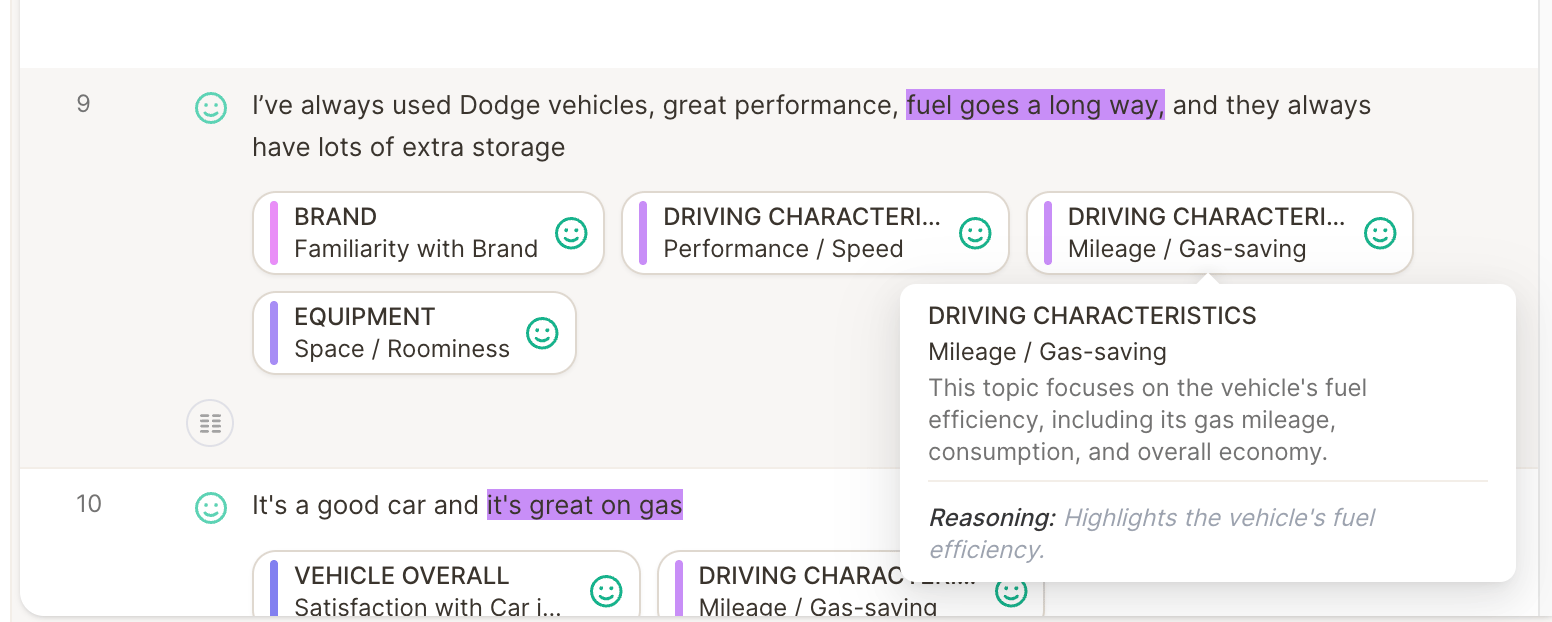
For example, a response that says *"I've always used Dodge vehicles, great performance, fuel goes a long way, and they always have lots of extra storage"* gets assigned to **Driving Characteristics → Mileage / Gas-saving**, with the phrase "fuel goes a long way" highlighted. Hovering the topic shows the Topic Description ("This topic focuses on the vehicle's fuel efficiency, including its gas mileage, consumption, and overall economy") along with the reasoning: *"Highlights the vehicle's fuel efficiency."*
## Why this matters
Without Advanced Output, you see *what* topic was assigned. With it, you see *why* — which makes it much faster to:
* **Spot-check AI accuracy** without re-reading the full response
* **Trust borderline assignments**, since the reasoning shows exactly what the AI keyed off
* **Refine topic descriptions**, since a wrong or unclear reason often points directly at what to fix in the description
## What changed
* **Enabled by default** — no setup required, it now applies automatically to all projects using the new LLM.
* **No longer a paid add-on** — previously optional/at cost, now included at no extra charge.
If translations are enabled on a project, Advanced Output is only calculated for the **translated values**, not the original source text. This is intentional — running it for both source and translated values would significantly increase LLM cost. If you expect to see highlighted phrases and reasoning on the source-language responses and don't, check whether translations are enabled for the project.
If you were already reviewing rows manually, Advanced Output makes that review faster: instead of reading the whole verbatim again, just check whether the highlighted phrase and reasoning actually support the assigned topic.
## What it does
Advanced Output adds **reasoning and phrase highlighting** to every topic assignment, so you can see exactly which part of a response justified each topic — instead of just trusting the label.
For each assigned topic, you get:
* **The highlighted phrase(s)** in the original text that triggered the assignment
* **Topic Description** — a reminder of what the topic is meant to capture
* **Reason for assignment** — a short, specific explanation tying the highlighted phrase back to the topic
For example, a response that says *"I've always used Dodge vehicles, great performance, fuel goes a long way, and they always have lots of extra storage"* gets assigned to **Driving Characteristics → Mileage / Gas-saving**, with the phrase "fuel goes a long way" highlighted. Hovering the topic shows the Topic Description ("This topic focuses on the vehicle's fuel efficiency, including its gas mileage, consumption, and overall economy") along with the reasoning: *"Highlights the vehicle's fuel efficiency."*
## Why this matters
Without Advanced Output, you see *what* topic was assigned. With it, you see *why* — which makes it much faster to:
* **Spot-check AI accuracy** without re-reading the full response
* **Trust borderline assignments**, since the reasoning shows exactly what the AI keyed off
* **Refine topic descriptions**, since a wrong or unclear reason often points directly at what to fix in the description
## What changed
* **Enabled by default** — no setup required, it now applies automatically to all projects using the new LLM.
* **No longer a paid add-on** — previously optional/at cost, now included at no extra charge.
If translations are enabled on a project, Advanced Output is only calculated for the **translated values**, not the original source text. This is intentional — running it for both source and translated values would significantly increase LLM cost. If you expect to see highlighted phrases and reasoning on the source-language responses and don't, check whether translations are enabled for the project.
If you were already reviewing rows manually, Advanced Output makes that review faster: instead of reading the whole verbatim again, just check whether the highlighted phrase and reasoning actually support the assigned topic.