> ## Documentation Index
> Fetch the complete documentation index at: https://docs.caplena.com/llms.txt
> Use this file to discover all available pages before exploring further.
# How to Ensure High-Quality Results with the LLM
> Learn how to guide Caplena's LLM-based AI for precise topic assignments in just a few runs.
Caplena's **LLM-based AI** assigns topics faster, smarter, and with human-level accuracy. You no longer need endless manual reviews — what matters most now is how you **set up and refine your topics and descriptions**.
Here are our best tips to make sure your AI delivers excellent, trustworthy results.
## Tip 1: Understand how the LLM-based AI works
* The AI uses all available **project context** — project name, description, column titles, and of course, your text data.
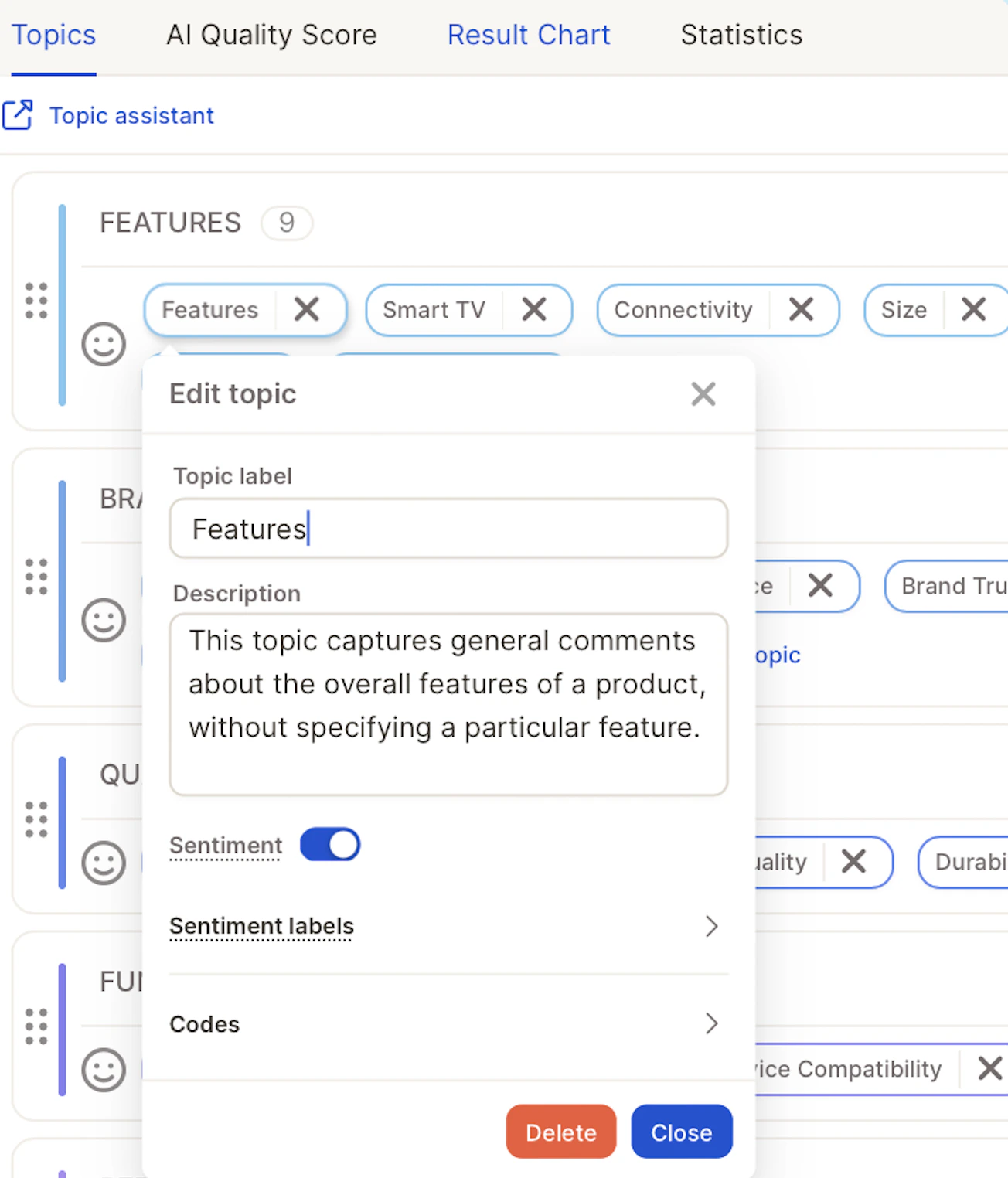
* When you click **Done** in the Topic Assistant, the AI automatically:
1. Generates **topic descriptions** for each topic.
2. Assigns topics to your data using those descriptions.
3. Calculates an **AI Score** to indicate overall quality.
 ### Understanding Topic Assignment Consistency
The AI score reflects both the **quality** and **stability** of topic assignments. To produce reliable results, the model draws on your project background, examples, and topic descriptions, and runs the assignment multiple times — comparing results to arrive at the most consistent answer.
A **high score** means topics are well-differentiated, resulting in clear and stable decisions. A **lower score** suggests the boundaries between some topics may not be entirely clear-cut and could benefit from more distinct descriptions.
## Tip 2: Focus on Topics and their Descriptions
### Review & Adjust Your Topics
* Check for **duplicates or overlaps** — merge similar topics like *"Late Delivery"* and *"Shipping Delays"* into *"Delivery Issues".*
* Remove irrelevant or overly specific topics that don't add value.
* Add **missing topics** if you notice recurring ideas not yet covered.
### Understanding Topic Assignment Consistency
The AI score reflects both the **quality** and **stability** of topic assignments. To produce reliable results, the model draws on your project background, examples, and topic descriptions, and runs the assignment multiple times — comparing results to arrive at the most consistent answer.
A **high score** means topics are well-differentiated, resulting in clear and stable decisions. A **lower score** suggests the boundaries between some topics may not be entirely clear-cut and could benefit from more distinct descriptions.
## Tip 2: Focus on Topics and their Descriptions
### Review & Adjust Your Topics
* Check for **duplicates or overlaps** — merge similar topics like *"Late Delivery"* and *"Shipping Delays"* into *"Delivery Issues".*
* Remove irrelevant or overly specific topics that don't add value.
* Add **missing topics** if you notice recurring ideas not yet covered.
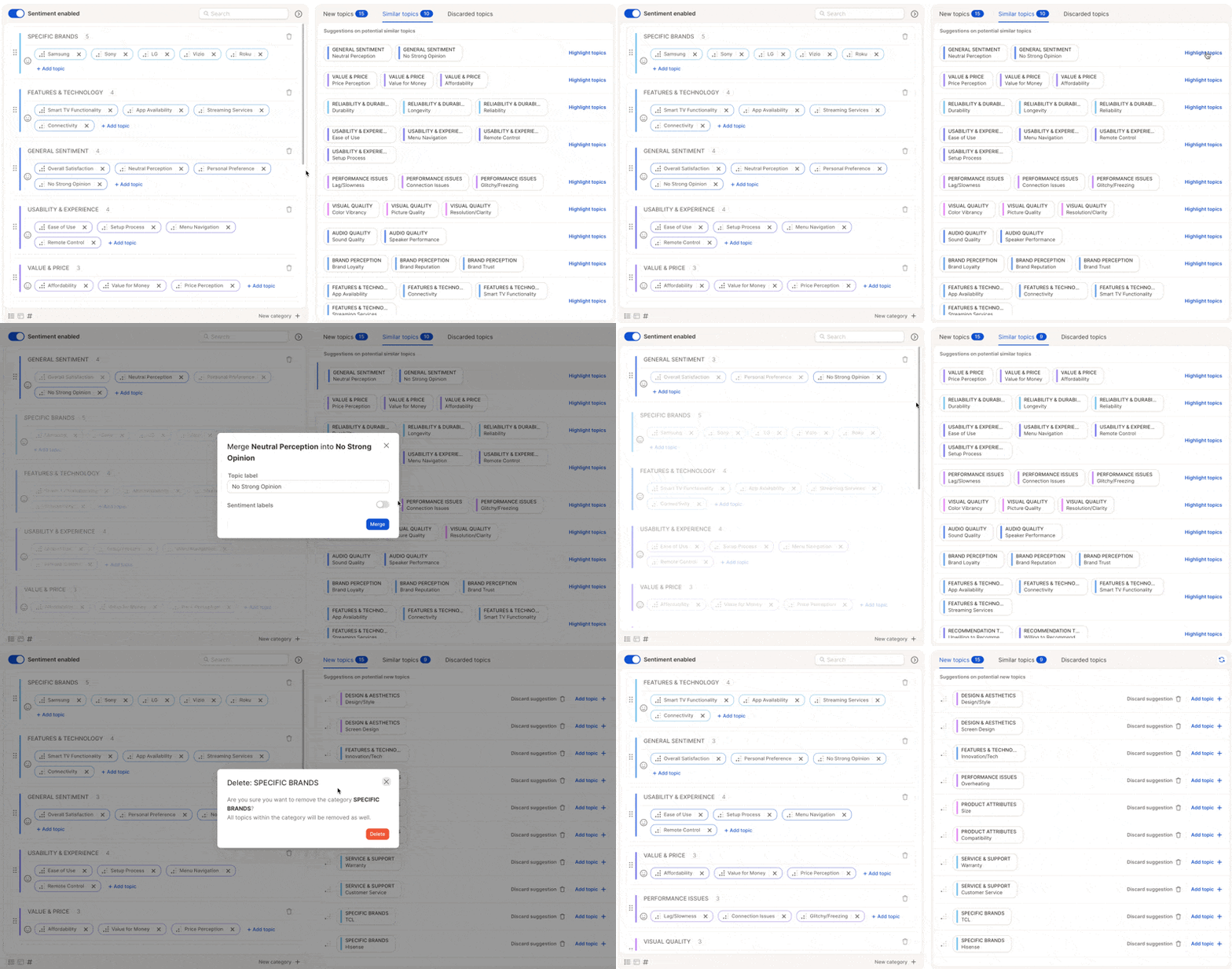 Do all your topic cleanup **before** finalizing the topic collection. You'll save a rerun and improve the AI's learning context dramatically.
### Perfect Your Topic Descriptions
Topic descriptions are the **core input for the LLM-based AI**. The model reads these to understand what each topic means and uses them to decide how to assign responses.
Here's how to handle them effectively:
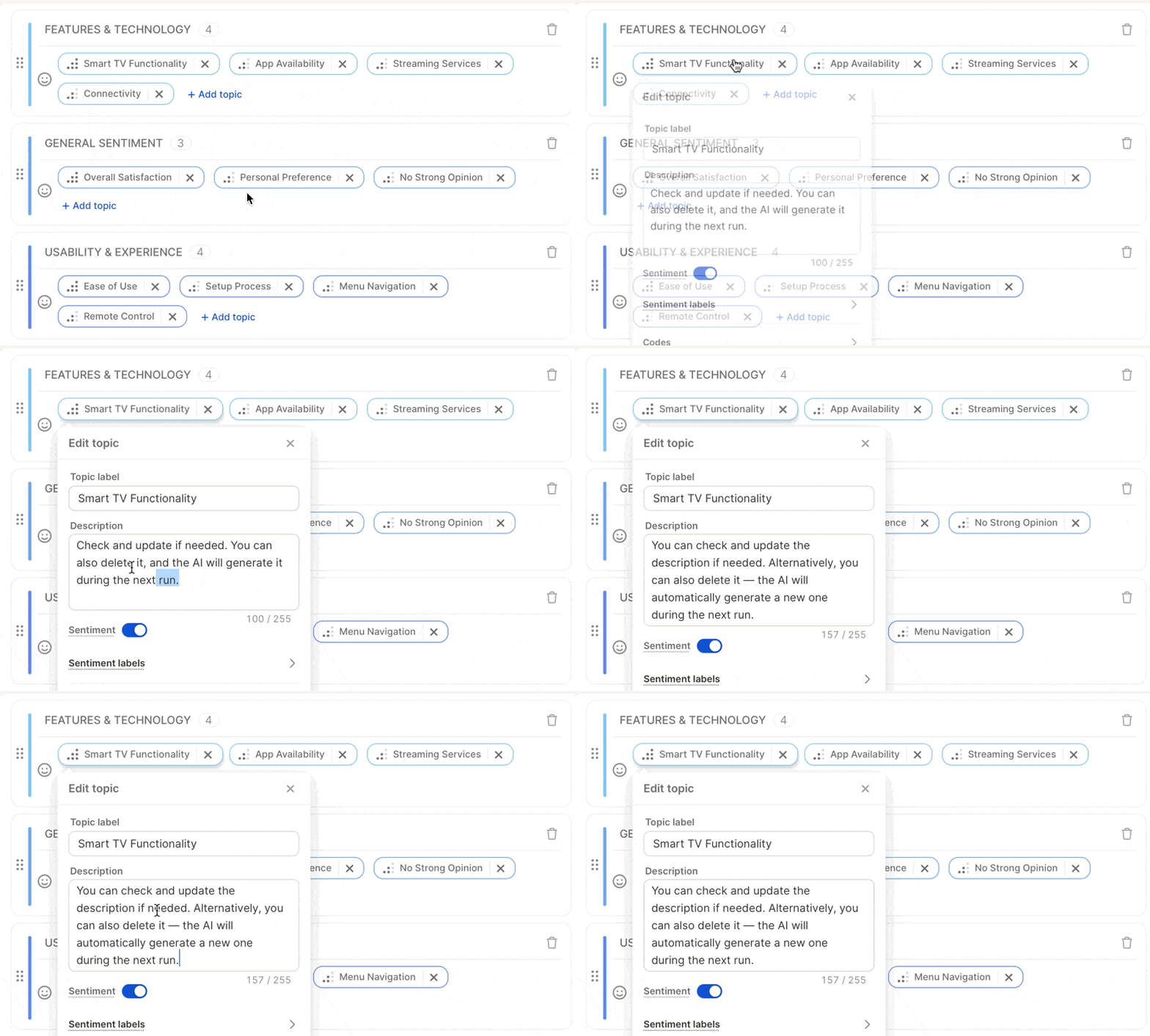
* Review all generated descriptions after the first run.
* Edit vague or generic ones, or delete confusing descriptions — the AI will automatically regenerate better ones during the next run.
* Avoid overlaps — make sure descriptions clearly distinguish similar topics.
Do all your topic cleanup **before** finalizing the topic collection. You'll save a rerun and improve the AI's learning context dramatically.
### Perfect Your Topic Descriptions
Topic descriptions are the **core input for the LLM-based AI**. The model reads these to understand what each topic means and uses them to decide how to assign responses.
Here's how to handle them effectively:
* Review all generated descriptions after the first run.
* Edit vague or generic ones, or delete confusing descriptions — the AI will automatically regenerate better ones during the next run.
* Avoid overlaps — make sure descriptions clearly distinguish similar topics.
 ## Tip 3: Do Smart Quality Checks
You no longer need to review hundreds of rows. Instead, use **targeted checks**:
1. **Check coverage** — if \~90% of rows have topics, you're in great shape.
2. **Spot-check 10–15 responses** — make sure assignments make sense.
3. **Use AI certainty** (optional) — rows with low confidence might reveal topics needing better descriptions.
4. **Focus on weak spots** — review topics with low coverage or unclear descriptions.
## Tip 4: Understand the AI Score
## Tip 3: Do Smart Quality Checks
You no longer need to review hundreds of rows. Instead, use **targeted checks**:
1. **Check coverage** — if \~90% of rows have topics, you're in great shape.
2. **Spot-check 10–15 responses** — make sure assignments make sense.
3. **Use AI certainty** (optional) — rows with low confidence might reveal topics needing better descriptions.
4. **Focus on weak spots** — review topics with low coverage or unclear descriptions.
## Tip 4: Understand the AI Score
 After each run you see an **AI Score**: how confidently the model assigned topics overall.
| Scenario | Typical score |
| :---------------------------- | :------------ |
| Same person codes twice | \~90 |
| Two people code independently | 70–80 |
| Human-level AI performance | 70–85 |
## Tip 5: Refine Before Rerunning
Before running again, ask yourself:
* Are my topic descriptions clear and specific?
* Have I merged similar or overlapping topics?
* Have I removed or rewritten any confusing descriptions?
**Caplena supports both partial and full AI updates**:
* For small changes (e.g., updating 1–2 topics), a **partial update** is more efficient.
* For broader changes, a **full update** ensures consistency across your dataset.
Once you trigger a rerun, the AI will regenerate missing or deleted descriptions and reassign topics based on your updated setup.
## Tip 6: Know When to Stop
Your project is ready when:
* The **AI Score** is 70+
* Each topic has a clear, correct description
* Most responses have a topic
* Spot checks look accurate
After each run you see an **AI Score**: how confidently the model assigned topics overall.
| Scenario | Typical score |
| :---------------------------- | :------------ |
| Same person codes twice | \~90 |
| Two people code independently | 70–80 |
| Human-level AI performance | 70–85 |
## Tip 5: Refine Before Rerunning
Before running again, ask yourself:
* Are my topic descriptions clear and specific?
* Have I merged similar or overlapping topics?
* Have I removed or rewritten any confusing descriptions?
**Caplena supports both partial and full AI updates**:
* For small changes (e.g., updating 1–2 topics), a **partial update** is more efficient.
* For broader changes, a **full update** ensures consistency across your dataset.
Once you trigger a rerun, the AI will regenerate missing or deleted descriptions and reassign topics based on your updated setup.
## Tip 6: Know When to Stop
Your project is ready when:
* The **AI Score** is 70+
* Each topic has a clear, correct description
* Most responses have a topic
* Spot checks look accurate