> ## Documentation Index
> Fetch the complete documentation index at: https://docs.caplena.com/llms.txt
> Use this file to discover all available pages before exploring further.
# Group Identical Rows
> Simplify your workspace by collapsing duplicate responses into a single row — without affecting your data or analysis.
This setting simplifies your view by collapsing duplicate responses into a single row, keeping your workspace clean without affecting any analysis or exports.
## How to turn it on
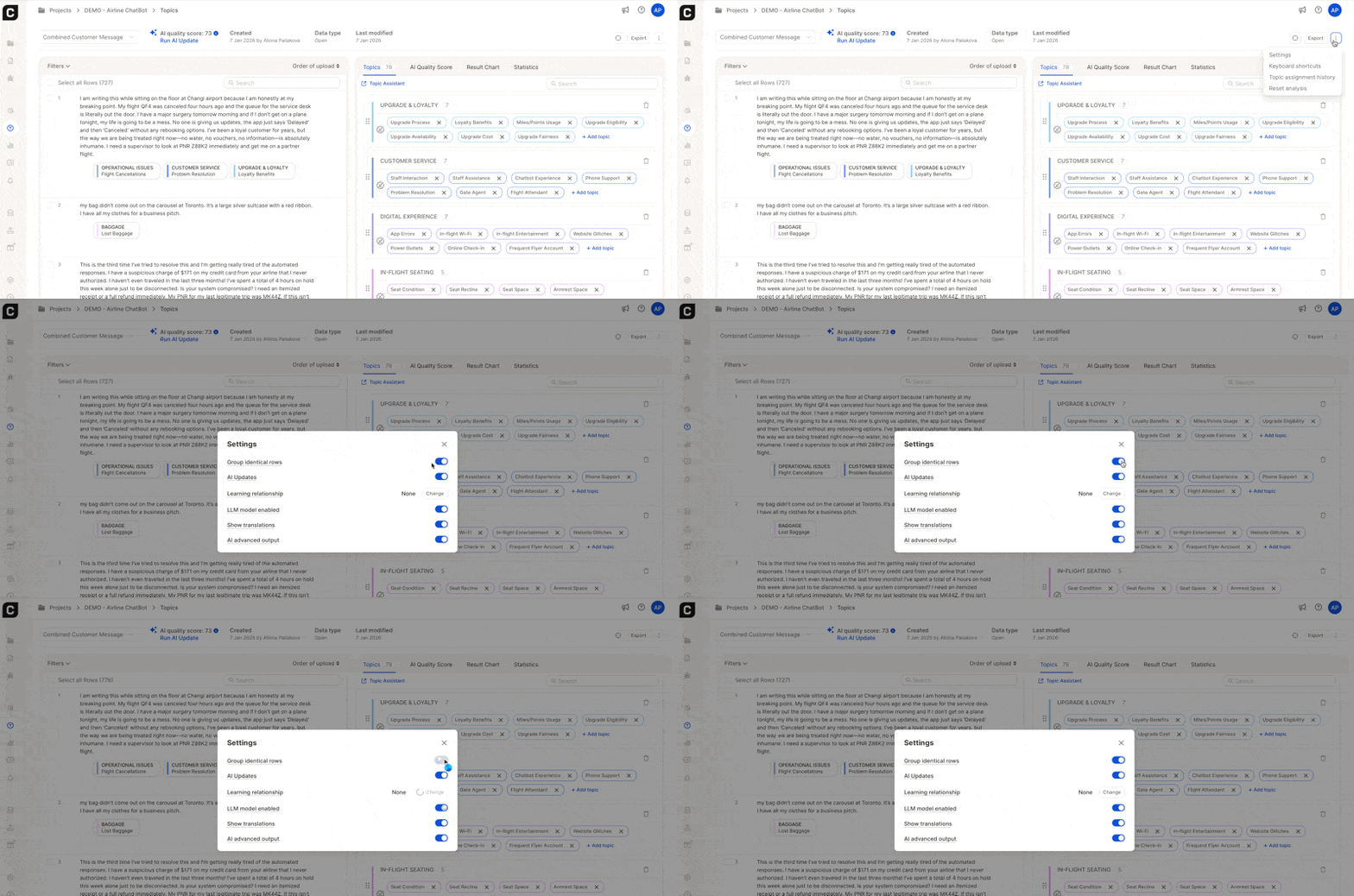
Click the three dots (⋯) in the top right of the Data Tab and select **Settings**.
Toggle on **Group identical rows**.
 ## What it does
When enabled, responses with identical text (ignoring capitalization) are shown only once in the list. Topics are still applied to every occurrence behind the scenes, you just see a tidier view. This setting only affects what you see on screen; it has no impact on your data or results.\
\\
## What it does
When enabled, responses with identical text (ignoring capitalization) are shown only once in the list. Topics are still applied to every occurrence behind the scenes, you just see a tidier view. This setting only affects what you see on screen; it has no impact on your data or results.\
\\
 **Example:** If 20 respondents all wrote "Great", you'll see it appear once in the list. All 20 responses are still counted in statistics and included in exports.
## What changed in duplicate grouping
The grouping behaviour was recently updated to be more consistent. As a result, responses that previously appeared grouped may now show separately if their topic assignments differ.
**Example:** If 20 respondents all wrote "Great", you'll see it appear once in the list. All 20 responses are still counted in statistics and included in exports.
## What changed in duplicate grouping
The grouping behaviour was recently updated to be more consistent. As a result, responses that previously appeared grouped may now show separately if their topic assignments differ.
 ### How to regroup duplicates
If responses that used to be grouped are now showing separately, it's because they have different topic assignments. Here's how to fix it:
Select all rows with the same response text.
Use **Bulk Assign** to give them the same topics.
Make sure their review status also matches (all reviewed or all unreviewed).
Regrouping isn't instant — it may take a couple of minutes to apply.
### How to regroup duplicates
If responses that used to be grouped are now showing separately, it's because they have different topic assignments. Here's how to fix it:
Select all rows with the same response text.
Use **Bulk Assign** to give them the same topics.
Make sure their review status also matches (all reviewed or all unreviewed).
Regrouping isn't instant — it may take a couple of minutes to apply.