
Credits are Caplena’s internal currency. You use them to pay for AI-powered analyses and features within the platform.
How Credits Are Used
All compute-heavy, AI-powered actions consume credits. The main actions are:
Analyzing Open-Ends
Each text entry (i.e., one cell in your uploaded file) costs 1 credit per selected text-to-analyze (TTA) column .You’re only charged for the columns you selected to analyze.
What’s free?
-
Columns you don’t select for analysis (like ratings, demographics, segments)
-
Empty cells
-
Cells with defined dummy values (like “N/A” or “-”)
When are credits charged?
-
Credits are charged immediately upon upload, based on your selected TTA columns.
-
You’ll always see a preview of how many credits will be used before confirming the upload.
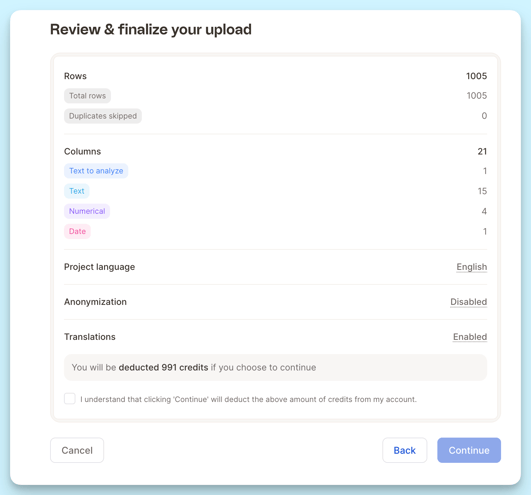
Example (screenshot above):
I uploaded a file with 1005 rows, but only 991 credits were charged, because some entries were either empty
Re-running Analyses (New or Updated Topic Assignments)
What’s included for free?
Every project includes a number of free AI topic re-assignments, depending on your plan.
You can:
-
Re-run the entire analysis (full run), or
-
Make smaller updates, like adjusting or reassigning individual topics (partial run)
Partial runs only count proportionally toward your free quota, so you’re only using what you need.
What happens after the free runs?
If you ever want to re-analyze everything after using up your free runs, you can still do it, at additional cost. Beyond the free quota, additional full runs cost 50% of the original import cost.
Example:
Let’s say your original import cost 1,000 credits.
Once your free quota is used up, a full re-run will cost 500 credits (50% of the original).
You’ll always be notified before any additional credits are used.
LLM Smart Columns
-
Most plans come with a free quota of Smart Column runs.
-
These are used automatically when you create or apply a Smart Column.
-
You’ll always see how many free runs you have left, and no credits will be used until the free quota is used up.
What happens after the free runs?
-
Once your free quota is used up, each computed row costs 0.25 credits.
What If I Make a Mistake?
No worries,we’ve got you covered!
-
Every account comes with built-in demo projects, which do not consume any credits.
-
For accidental uploads or honest mistakes, we're happy to reimburse credits, at least partially (translation fees may be excluded since they’re paid directly to third parties).
-
For testing, we recommend uploading small sample datasets first.
Tracking Your Credit Usage
You can monitor your credit balance and usage anytime by visiting your Account Page (you must be logged in to access it).
Need help with credit management or reimbursement?
Contact our support team, we’re always happy to assist.