

When to use it
Reach for Topic Critique when the AI-assigned topics don’t match your expectations — for example:- “Why isn’t topic X assigned to these rows?”
- “How can I improve the AI score on this column?”
- “The topics overlap — can you fix them?”
- “The sentiment on topic X is often wrong — how do I fix it?”
Topic Critique is only available to users with edit permission on the project. Report-only viewers can’t invoke it, because it can modify the topic collection.
How to invoke it
Topic Critique doesn’t have its own tab, you invoke it through Agent. Open Agent from the project overview, the Agent tab, or a report, and ask a topic-assignment question; Agent hands the conversation off to Topic Critique automatically when the question is about assignment quality or the topic collection. If your project has more than one Open or Semi-Open column, name the column in your prompt — for example, “Critique the topic assignment on the ‘Overall Feedback’ column.” Page context: if you open Agent, or click a magic-wand shortcut, from the Topic Assignment page of a specific column, it automatically targets that column, so you don’t need to name it. This is a per-message hint, not a persisted filter: switch columns and ask again, and it follows you; you can always override it by naming a different column explicitly. Below is an example of starting Topic Critique from the Topic Assignment page, clicking the magic-wand icon next to the AI quality score pre-fills a prompt targeting that column automatically:What it does
Topic Critique works in phases and always explains its reasoning before proposing a change:- Analyzes the topic collection for overlapping or ambiguous descriptions, mismatched labels, and sentiment configuration that looks off.
- Checks manual reviews for labeling consistency, review coverage, and sentiment accuracy versus reviewer choices.
- Grounds findings in real rows — pulls example rows and topic statistics so the diagnosis ties to your actual data.
- Proposes changes — a prioritized list, usually description refinements first, then structural changes (merges, splits, new topics, sentiment toggles), then manual-review suggestions.
- Optionally tests on a subset before applying, so you can see the effect of description tweaks, sentiment toggles, or new/excluded topics before committing.
- Edits the topic collection, only after you confirm. All edits from one conversation are grouped into a single, revertible version-history entry.
Semi-Open columns
Semi-Open topics are matched by keywords, not an AI reading a description, so the critique adapts:- Analyzes keywords for overlap, missing keywords, and near-duplicates — the Semi-Open equivalent of ambiguous descriptions.
- Reports keyword coverage per topic and suggests candidate keywords from frequent terms in uncovered answers.
- Codes sample answers with the actual Semi-Open autocoder rather than guessing, so recommendations reflect real behavior.
- Flags inconsistencies between reviewed rows and current keywords.
- Edits act on keywords directly and are grouped into the same revertible history entry as Open-column edits.
- No AI score, sentiment, or subset tests — Semi-Open columns don’t have those, so it focuses on keyword quality and coverage instead.
Understanding the AI score
The AI score reflects how confident the AI is in its own topic assignments across the whole column — it isn’t a comparison against manually reviewed rows. (Semi-Open columns don’t have an AI score; use keyword coverage as the equivalent signal.)- Reviewing more rows does not raise the score — reviews are useful for sanity-checking, but don’t change predictions on unreviewed rows.
- Improving topic descriptions almost always does — a low score usually means overlapping, ambiguous, or poorly worded descriptions, which is exactly what Topic Critique is built to fix.
Reviewing changes it made
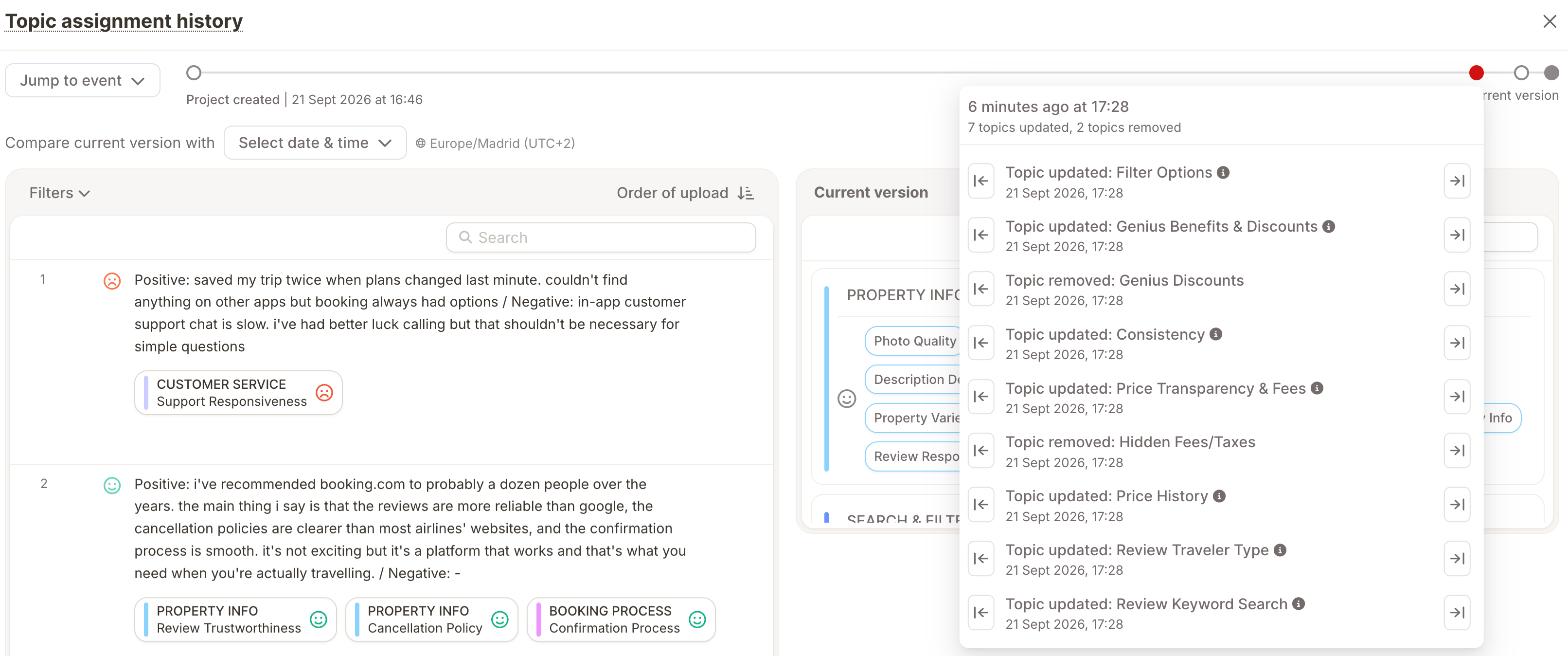
Every edit is recorded in the topic assignment version history alongside your manual edits and AI reassignments, marked with a distinct sparkles badge so you can tell agent-driven changes apart. To review or revert them:- Open the column’s Topic Assignment page.
- Click History in the top-right corner.
- Pick the timestamp just before the agent’s changes
- Use Restore to roll the topic collection back to that point if you want to undo the changes.
Tips for better critiques
- Be specific about the column and the problem. “Why is ‘Delivery Speed’ rarely assigned even though customers mention it a lot?” works better than “the topics look wrong.”
- Let it plan before it edits. Read its diagnosis before confirming an edit.
- Use subset tests for risky changes — big rewrites, restructures, or new/removed topics.
- Follow up with a full run so every row benefits from the new topic collection.